 Topicle Beta
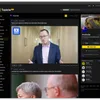
Thanks to everyone who has stuck around over the past two weeks since various launches on Reddit. Since then, Topicle has picked up a bunch of new features:
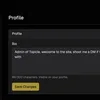
- Avatars and profile covers. You can now upload a profile picture, shown next to your username everywhere on the site, and a banner image for your profile page. Both are in Settings > Profile.
- Profile colours. Every account gets its own colour scheme, generated from your username and used for your avatar and profile banner until you upload images. If you don't like the colour you were dealt, you can now pick a different one in Settings > Profile, or leave it on Auto.
- New sidebar navigation. Desktop gets a proper left sidebar: your communities with their icons, favourites you can pin with a star, and quick links for Home, Subscribed, All and Random. It collapses to a compact icon rail (hover for names), and gets out of the way automatically on smaller screens.
- Card view on desktop. The image-first card layout from mobile is now available on desktop too. Look for the layout toggle at the top of the feed.
- An improved onboarding experience where you can select your interests and are assigned default subs this way is live, along with an escape hatch if you just want the normal defaults.
- Also new: a full Active Discussions page, crossposting between communities, Imgur video embeds, paste-to-markdown in the editor, and clearer status badges on your own posts while they're in review.
As always, feedback welcome in the comments or via the feedback button.
Still to come:
- iOS app is under heavy development right now (Android still coming too)
- Sign in with Apple will be enabled in the coming week
- Optional real-person verification, to combat bots and ensure you're speaking to a real person
- Optional age verification so we can switch on NSFW content while complying with eSafety laws
- Animated gifs in comments (can be toggled on and off by sub moderators, off by default)
- Mod-selectable sub-specific rule sets: strict, standard, and loose, instead of one-size-fits-all rules for every sub
- Video posts
- Many more
7 comments
I'm trying to upload both an avatar and profile cover but both fail with the message "Failed to upload avatar". Are there size restrictions?
Let me check it out, be right back to you.
Ok, we should be good to go now. The new code had been deployed to the server, but not the correct Docker setup for receiving uploaded profile pics or cover images. Oversight on my part, apologies! I've just tested it now and it appears to work, please try it again and thanks for testing it so quickly after deployment!
All good. You are doing a bang-up job.
Thanks, appreciate it! Let me know if you run into issues or have any feedback with the new features.
Sometimes when I click All on the sidebar it shows No posts yet. Hitting refresh fills the page with posts.
I've deployed a fix for this just now, let me know if you see anything like this in the future.